Regression testing a connected product, release after release
Every firmware build and every cloud deploy can break something the team already checked. Regression testing a connected product means running the same system test, from the same starting state, on every release, and keeping a record that shows why the release is or isn't ready.
This guide covers what that takes at the system level: where the work usually sits today, what makes a run repeatable, how to keep the test current as the product changes, and what the record of each run gives the people who have to call a release.
Why regression is harder on a connected product
Most teams already automate unit tests, API tests, and builds, and they trust what those say about the code. The gap opens where the cloud service, the gateway, the device, and the test equipment on the bench have to be exercised together. A component can pass every check of its own while the system around it fails.
In many teams, that system pass is still a person working through a checklist before each release. It's a rational tradeoff: the environments are fragmented, the setup is custom, and the scripts that exist were written for one bench by one engineer. The cost shows up later. A full regression takes engineering time the schedule didn't plan for, the release waits on one person's calendar, and whatever the checklist didn't cover is found in the field.
Much of the published advice on this names orchestration across hardware, cloud, and app as the hard part, then stops there. The rest of this guide is about what a repeatable system test needs, and what its record gives a release decision. If you don't have that system test yet, start with how to test a connected product end to end.
Start every run from a known state
A regression is only worth comparing across releases if each run starts from the same place. On a connected product, that state is spread across parts: what the device is set to, what it has stored, what the equipment on the bench is wired to watch.
In Knilb, a test case is split into ordered clauses. Setup prepares the starting state, Sequence is the test itself, and Teardown cleans up afterward. Setup runs the steps you write, so write them to work from whatever the last run left behind: a failure in Setup or Sequence ends the case before Teardown runs. With preparation kept apart from the test body, the log shows whether a problem came from getting the system ready or from the product.
Two more rules keep a red run meaningful:
- The run checks before it touches anything. Before any step reaches a device, the run refuses a deployment that isn't ready, or one whose device credentials the runner's machine doesn't hold. An unready deployment is turned away rather than half-tested.
- The first failure ends the case. The steps after it are kept in the record, marked "Not reached", and the result is saved even on failure. The log reads as one cause rather than a cascade of failures that all trace back to it.
For an engineering leader, that's the difference that matters: setup trouble and product trouble show up in different places, so a failed regression starts from a named step rather than a search. A failure past Setup can still be the bench, such as a loose wire, so someone reads that step before stopping a release. The documentation on test definitions covers clauses in detail.
Keep the test in step with the product's contract
Between releases, the product changes under the test. A firmware update drops an endpoint or renames an operation, and a regression written last quarter is now asking for something the device no longer has. Left alone, that test either fails for the wrong reason or, worse, keeps running steps that no longer mean anything.
Knilb tests are written against each part's API contract, held in Knilb as a spec. When the contract changes, save the new version over the spec, and the test is checked against it twice:
- On the deployment, a warning names each step whose spec no longer declares its operation, alongside other gaps such as roles with nothing cast into them. Warnings advise; they never stop a run.
- During a run, a step whose operation its role's spec no longer declares ends the case before its request is sent.
So a contract change surfaces as a named problem with the test, at the step it affects, rather than as a mysterious failure on the bench. Both checks read the spec saved in Knilb, not the device, so they catch nothing until the new version is saved, and a step on a role with no spec isn't checked. Create a deployment lists every warning.
What the record of each run gives a release decision
A pass or a fail on its own answers one question: did it work this time? A release decision usually needs more. Is this the same test that passed last release? Did the test change, or did the product? When it failed, what exactly was it pointed at?
Every Knilb result freezes the answer, the step log, the case as it ran, and the deployment as cast, filed together. A short fingerprint names the version of the case that ran, so two results can be compared on whether the test moved before they are compared on outcome. It freezes the record, not the bench: hardware and firmware move on, and the result keeps who played which part and what each step observed. Runs and results explains what's kept.
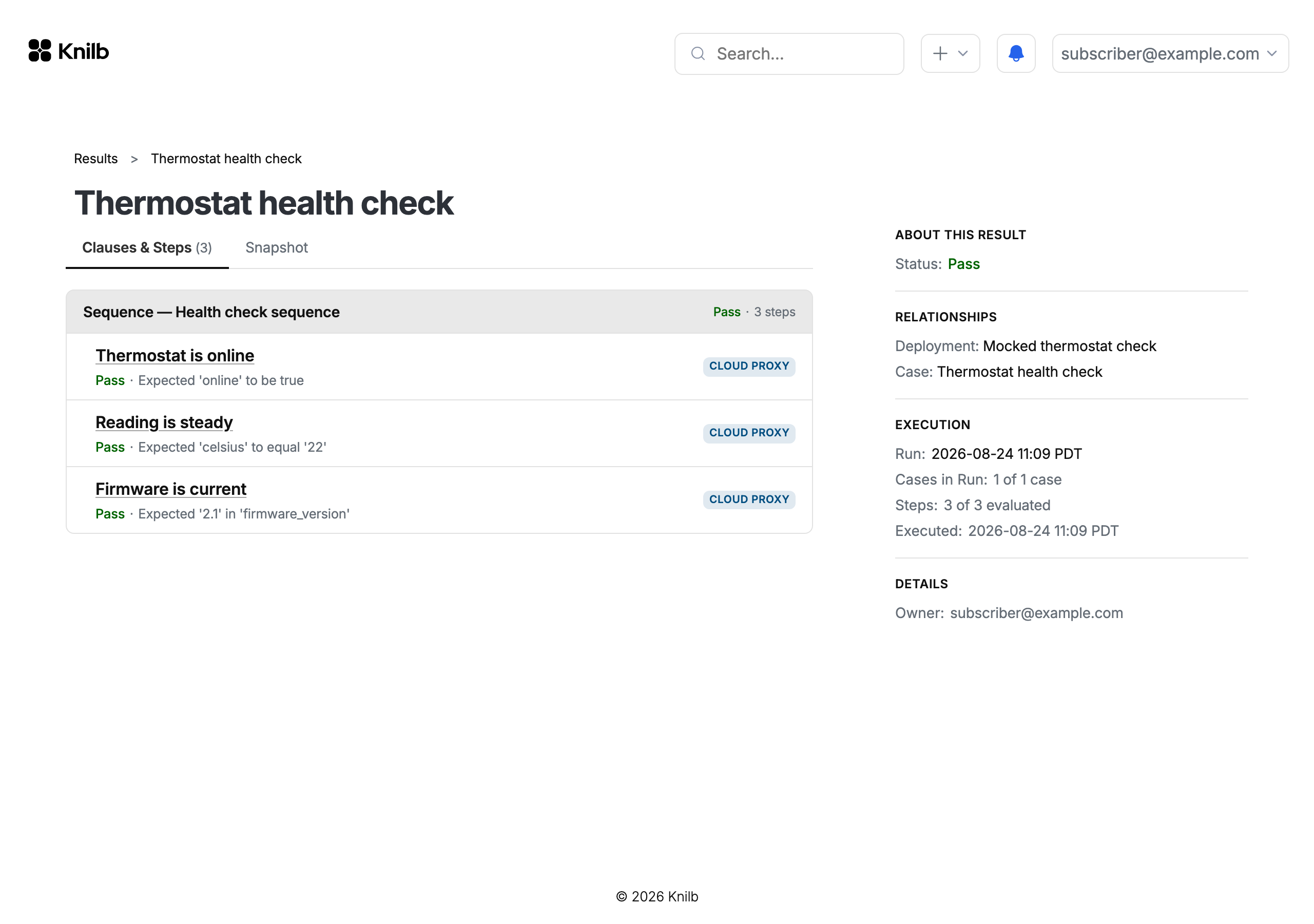
Two views build on that record:
- Changes. When the case has been edited since a run, the result's Changes tab sets the case as it ran against the case today, field by field. A separate notice says when a spec or the deployment has changed since the run; for the deployment, it says that something moved, not what.
- History. A step's History tab labels each past result with what decided it. On a step with header or body checks, a run of the same label across failures tells you whether the device went away, began refusing, or changed its answers.
The consequence is a release conversation that starts from a record you can reopen, rather than from someone's memory of the last full pass. When a field failure comes in, reproducing it starts from exactly what ran, against exactly what was cast. For a failing record, see a real bench, where one step fails at the wire while the software reports success. Read results covers each tab.
Make the regression outlive the person who built it
Ask a different question about your current regression: if the engineer who built the test setup left tomorrow, what would stop working? In many teams the honest answer is most of it, because the knowledge lives in that person's scripts and on that person's bench.
In Knilb, plans and cases are recorded in the product rather than in a folder of scripts. Steps target named roles, such as the device or the test equipment watching it, rather than particular machines, and a deployment casts a real part or a mock into each role. The same plan runs on another bench, or against mocks before the hardware arrives, without a step being rewritten. How it works shows how a run stays the same every time.
The run itself goes through the Knilb command-line tool, and a runner can be a bench machine or a CI container, with the runner token and device credentials supplied through environment variables. Two boundaries are worth stating plainly. Starting the run is up to your team or your own pipeline: Knilb has no CI trigger or scheduled run today. And test content belongs to the account that created it, with no teams or sharing within a company today, so decide up front which account holds the regression. Set up a runner covers headless machines.
How to tell the regression is working
The measures that matter to a release decision are the ones you can take to the rest of the business:
- Time to run a full regression, from deciding to test to having an answer.
- Time to reproduce a failure, from the report to a run that shows it.
- The share of system checks that run without a person, against those still done by hand.
- How often a release date holds once the regression has run.
Take a baseline before changing anything, then track the same four as the regression grows. A good place to start is the release-blocking check someone on the team still runs by hand, because it's usually the one the release waits on.
Work with us
Knilb is taking a small number of design partners: teams shipping a connected product on a real release cadence. Bring a regression you run by hand today, and we'll set it up with you.
Or try it first: the hardware-free tutorial takes you from an empty account to a passing result against a mocked device.