How to test a connected device before the hardware exists
The hardware isn't here yet, but the system test can be. Write it now against mocks built from the device's API contract, run it until it passes, and when the boards arrive, run the same plan against the real device with the mock taken off its role.
Firmware unit tests and emulators cover the code running on the device. This guide covers the other half: the system test across the device's API and the parts around it, written once and kept when the hardware shows up.
What you can test before the hardware exists
A system test is mostly decisions about the product, not about the bench. Which calls to make, in what order, from what starting state, and what each answer should be. None of that needs the device in the room. It needs the device's contract.
That is a lot of the work. A passing run against mocks settles that the steps are right, that they run in the right order, and that each check tests what it should. On many teams, all of that waits for the bench, and the first days with new hardware go to fixing the test instead of checking the device.
A mocked run doesn't settle how the device behaves, how long it takes to answer, or what happens at the wire. Those are the bench's questions, and the last section comes back to them.
Start from the device's API contract
The starting point is the OpenAPI contract the firmware and cloud teams already work from. Knilb imports it, OpenAPI 3.0 or 3.1 in YAML or JSON, and parses its operations, parameters, and responses.
A contract this small is enough to begin:
openapi: 3.0.3
info:
  title: Sensor hub API
  version: 1.0.0
paths:
  /status:
    get:
      responses:
        '200':
          description: Current status
          content:
            application/json:
              schema:
                type: object
                properties:
                  online:
                    type: boolean
                  firmware_version:
                    type: string
              example:
                online: true
                firmware_version: "1.4.0"
  /readings/latest:
    get:
      responses:
        '200':
          description: Latest reading
          content:
            application/json:
              schema:
                type: object
                properties:
                  celsius:
                    type: number
                  sensor_ok:
                    type: boolean
              example:
                celsius: 21.5
                sensor_ok: true
From then on, you pick operations, statuses, and response fields from what the contract declares rather than typing them. The test is written against the same interface the real device will answer on.
Build mocks for the answers you expect
A mock profile is a named scenario for one contract, such as "Normal operation" or "Sensor fault". Each response in it is picked from the operations the contract declares and the status codes it declares for each, with the body filled in a form built from the contract's schema. A profile holds one response per operation and status code, and only codes the contract declares, so a mock stays a variation on the contract rather than a way around it.
That makes fault paths cheap to test early. In the contract above, a "Sensor fault" profile answers /readings/latest with sensor_ok set to false, and the fault path is exercised by using that profile instead of the normal one, with no edits to the test. The fault you would otherwise wait for, or rig by hand on the bench, is a stored scenario you can run on demand.
Mocks can also live as OpenAPI files on the runner's disk, versioned with the rest of your code. knilb mock download exports a cloud profile to a file. The CLI serves only each response's example, and skips a response that has none.
A mock is a stored answer. It stands in for what the device says, not for how long it takes to say it: a mock answers at once. How mocks work covers the details.
Write the plan against roles, not devices
A plan declares named roles, each an alias and a contract: hub, speaking the Sensor hub API, for example. Steps target the role, never a specific machine. Nothing you write now is tied to the mock, because the mock is only what fills the role today.
Steps go into ordered Setup, Sequence, and Teardown clauses, so every run starts from a known state, does the work, and cleans up after itself. Each step checks the response it gets back: its status and the fields that matter, picked from the contract. This is how Knilb runs the same plan from mocks to hardware, and it's what keeps the test from being thrown away later.
Cast the mock and run the test
A deployment is where the abstract plan meets a testbed. It names the machine that runs the test and casts each role: the device that plays it and, for now, the mock profile that answers for it. You register the device by the address it will have, even though nothing is there to answer yet.
Then run it from that machine:
A mocked role never reaches the real device, even when no mock response matches. The step fails visibly instead. A rehearsal can run on a machine beside the bench, or on one with no devices at all, without touching hardware.
The tutorial walks this whole path, from an empty account to a passing result with a mocked device and no hardware anywhere.
Read what the green run proved
Every step records which layer answered it: DEVICE, CLOUD PROXY, CLOUD DOWNLOAD, or LOCAL FILE. A mocked run says plainly that a mock answered, so nobody mistakes a rehearsal for a hardware run, when it finishes or when someone reopens it later. Per-step badges need knilb 0.8.0 and knilb-cli 0.5.0 or newer. How to read them is in the docs.
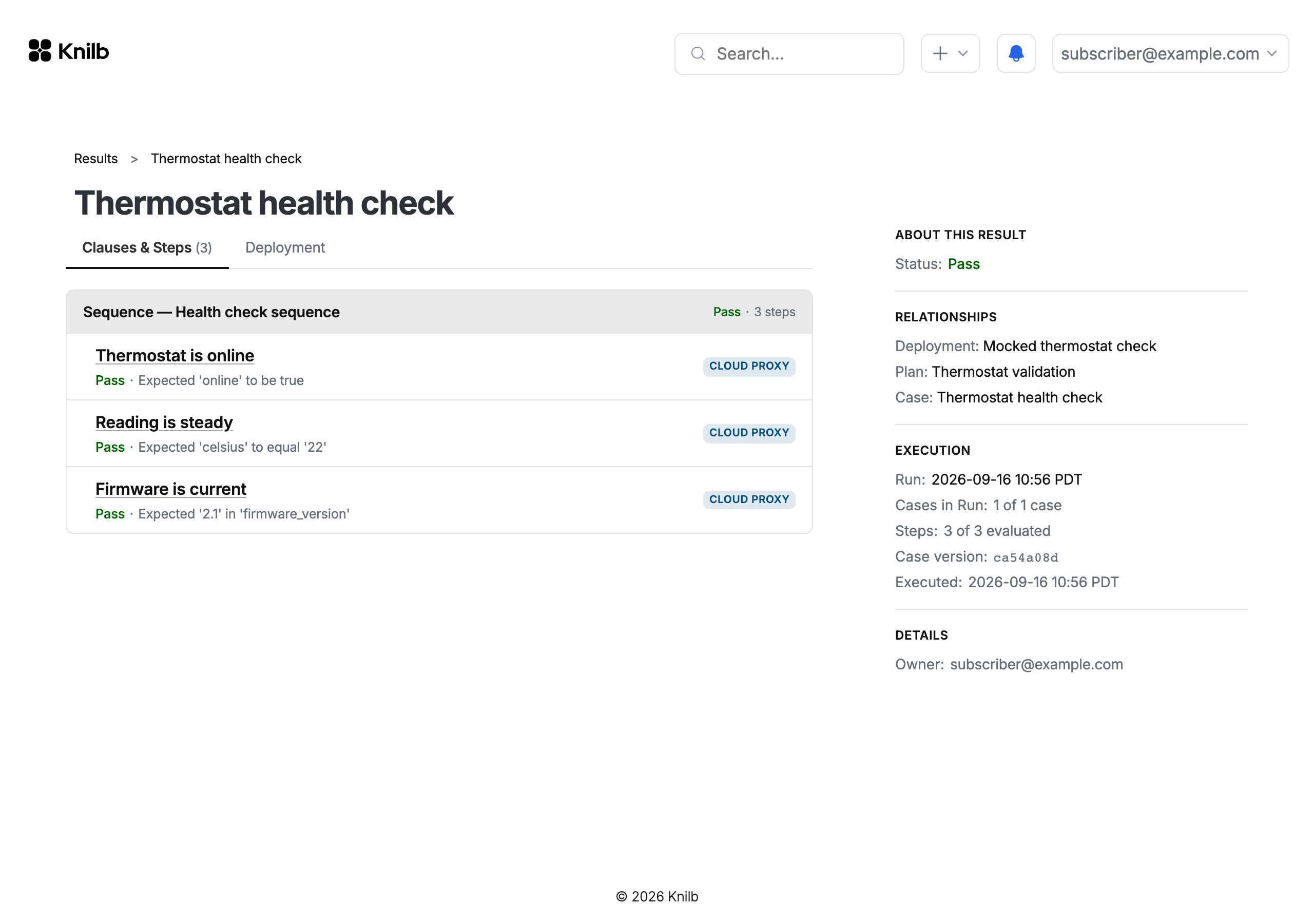
Every result also freezes the case and the cast it ran against, the mock profile included. Change the deployment tomorrow, and the rehearsal's record still says exactly what answered it.
Run the same test on the real device
When the hardware arrives, turn mocking off on the role's binding, so the device bound underneath answers. The plan, the case, and the steps stay as they are. Unbinding the mock is the whole difference between a rehearsal and a hardware run, and the steps are now badged DEVICE.
The bench answers what the mocks couldn't: real timing, real behavior, and, with test equipment cast into a role beside the device, what happened at the wire rather than what the device reports. The bench story shows that half on a real bench: one test, a real device, and a monitor on its output.
Keep the mock profiles. The fault scenarios stay castable when the bench is busy, or when a fault is hard to produce on the device itself. From there, the same plan can become the test you run on every release: regression testing a connected product covers what that takes.
Write and run your first test against a mocked device. No hardware needed.
If you're ready to run this against your own hardware, we work with a small number of design partners.